What Zigbee is
Zigbee is a network protocol for low-power devices. It runs on the IEEE 802.15.4 radio standard, most often at 2.4 GHz, at up to 250 kbit/s. The low speed is deliberate: a sensor sends a few bytes and can run for years on one battery.
Roles in the network
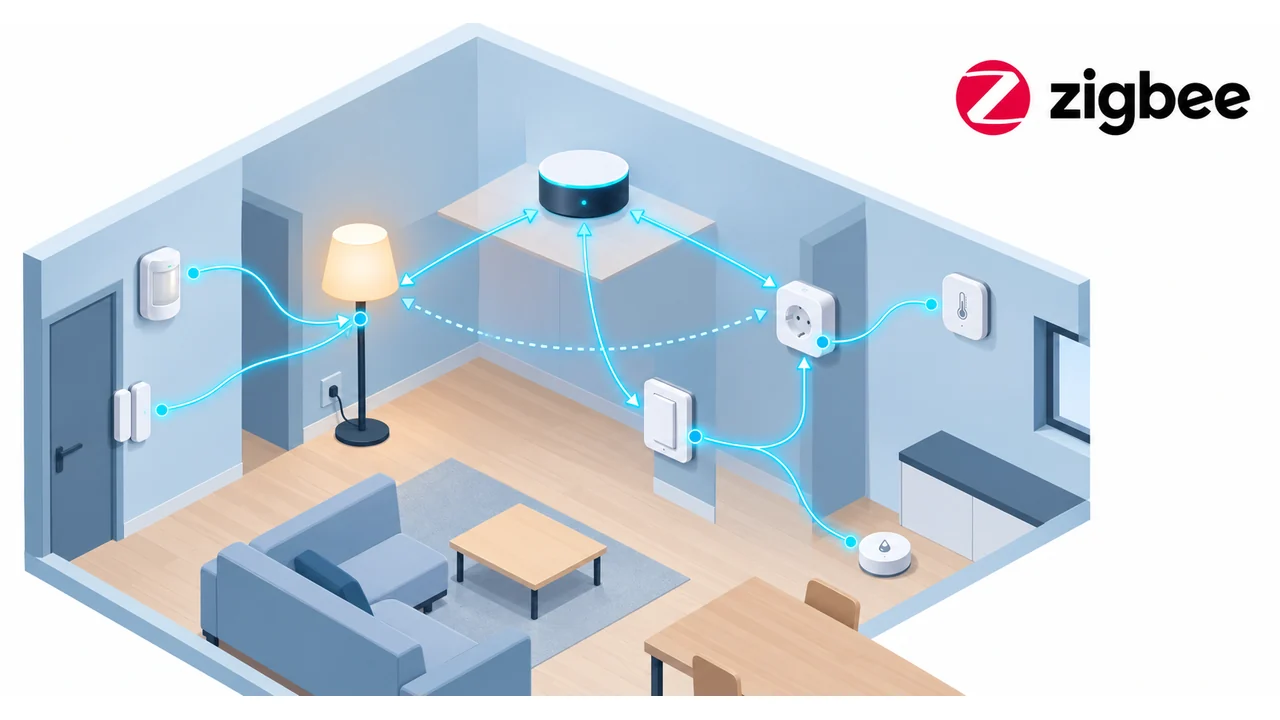
- Coordinator — creates the network, picks the channel and the PAN ID, hands out keys. There is exactly one per network.
- Router — a mains-powered device (lamp, plug). It relays packets for others and extends range.
- End device — usually battery-powered (sensor, button). It sleeps most of the time and talks only through its parent, a router or the coordinator.
Mesh and routing
Packets travel through routers and find their own path. If a router disappears, the network rearranges itself. Areas with battery sensors therefore need enough mains-powered devices, not just one central hub.
Channels and Wi-Fi
At 2.4 GHz Zigbee has channels 11–26. Wi-Fi on channels 1, 6 and 11 overlaps part of them. Zigbee channels 15, 20, 25 and 26 interfere least. The channel is chosen when the network is created and is hard to change later.
Security
Traffic is encrypted with AES-128. The network key is delivered when a device joins. Zigbee 3.0 also uses per-device install codes so the key cannot be sniffed during first pairing.
Profiles and clusters
Zigbee describes what a device is through clusters: On/Off, Level Control, Temperature Measurement and others. This lets lamps and switches from different makers work together.
Common mistakes
- Battery devices only, no routers — the network is unstable.
- Coordinator in a metal cabinet or next to a USB 3.0 port that emits 2.4 GHz noise.
- A channel that overlaps the neighbour's Wi-Fi.
- Mixing old and new firmware without checking compatibility.
Where it is used
Lighting, thermostat valves, door and motion sensors, metering plugs. It is typically managed through Home Assistant with Zigbee2MQTT or ZHA, or through a vendor hub.